Download OnStream APK for Smart TV (LG, Samsung, MI & Android TV Box)
Are you frustrated watching content on a small mobile screen and looking for a way to enjoy free streaming on your Smart TV? No need to search anymore. OnStream offers unlimited HD quality entertainment for Smart TVs, including LG, Samsung, MI, and Android TV Box. It is designed for smooth performance and provides a seamless streaming experience, completely free of cost.
This guide will help you install the app on your Smart TV and start enjoying your favorite movies, TV shows, and more on a bigger screen.
What is OnStream for Smart TV?
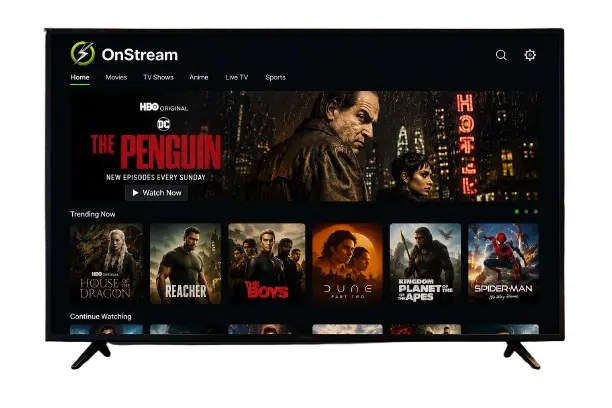
OnStream is one of the most popular streaming apps, offering HD quality streaming links and a huge collection of movies, TV shows, series, anime, and more. It provides free access to unlimited entertainment with features like no subscription, no sign up required, a simple user interface, smooth playback, and multi-language subtitles. Everything is available on one platform, allowing you to enjoy seamless streaming on your Smart TV.
Supported Smart TV Devices
OnStream can be used on several Smart TV devices. Below are the supported devices and how they work.
Android TV
This app is primarily designed for Android devices, making Android TVs the most compatible option. You can install the APK file by enabling Unknown Sources before installation.
Samsung Smart TV
Samsung Smart TVs run on Tizen OS, which does not support Android APK files. To use this app, you can use an Android TV Box, Amazon Fire TV Stick, or cast it from your Android phone.
LG Smart TV
LG Smart TVs use webOS, which also does not support Android APK files. To enjoy streaming, you can use an Android TV Box, Amazon Fire TV Stick, or cast it from your mobile device.
Mi TV
Mi TV runs on an Android TV platform, making it compatible with APK installation. Since the app is not available on the Google Play Store, you need to sideload the APK after enabling Unknown Sources.
Android TV Box
Android TV Box is one of the best options for using this app on a TV. It supports APK installation, allowing you to sideload the app after enabling Unknown Sources.
Features of OnStream APK for Smart TV
Here are some remarkable features that make OnStream a reliable and flexible choice for streaming on Smart TVs. These features provide a smooth, enjoyable, and user-friendly viewing experience.
HD Streaming Support
This app offers HD quality streaming, allowing you to watch your favorite movies and TV shows in high definition. It delivers a sharp, clear, and immersive viewing experience on larger screens.
Subtitles Support
It provides subtitles in multiple languages, allowing you to enjoy your favorite content in your preferred language. Whether you are watching Hollywood movies, Bollywood films, or Asian dramas, subtitles make the viewing experience more enjoyable.
Multiple Servers
This app offers multiple streaming servers to ensure smooth playback and reduce buffering issues. If one server is slow or unavailable, you can quickly switch to another for uninterrupted streaming.
Download Capability
You can download your favorite movies and TV shows directly to your Smart TV for offline viewing. This allows you to enjoy your content anytime without relying on an internet connection.
Favorites and Sharing Options
This feature lets you save your favorite content for quick access and share it with family or friends. It is a convenient way to organize your watchlist and plan movie nights together.
Regular Updates
The app receives regular updates to improve performance, fix bugs, and add the latest movies, TV shows, and series. This ensures you always have access to fresh content and new features.
Title Request Feature
If a movie or TV show is unavailable, you can request it through the app. This helps expand the content library based on user requests.
Simple TV-Friendly Interface
The interface is simple, clean, and easy to navigate on Smart TVs. You can quickly browse categories, search for content, and enjoy a smooth streaming experience without confusion.
Large Content Library
This app offers a huge collection of movies, TV shows, series, documentaries, anime, and more. Everything is organized in one place, making it easy to find content for every taste.
No Subscription Required
It provides unlimited HD quality entertainment completely free. There are no subscription fees or login requirements, allowing you to enjoy seamless streaming without paying anything.
How to Download and Install OnStream APK on Smart TV
Installing OnStream on your Smart TV depends on the device you are using. Android TV, Mi TV, and Android TV Box support APK installation, while Samsung and LG Smart TVs require alternative methods. Follow the instructions below for your device.
How to Install OnStream APK on Android TV & Mi TV
Android TV and Mi TV both support APK installation, allowing you to install this app directly on your device. Follow the steps below to complete the installation and start streaming on your big screen.
How to Use OnStream on Samsung & LG Smart TVs
Samsung and LG Smart TVs do not support direct APK installation. However, you can still enjoy OnStream by using one of the methods below.
How to Install OnStream APK on Android TV Box
Android TV Box fully supports APK installation, making it one of the best options for streaming OnStream on your TV. Follow these simple steps to install the app.
How to Log In to the OnStream TV App Using an OTP (Mobile to TV)
Logging in to the OnStream TV app using an OTP is quick and easy. Follow the steps below to connect your mobile phone with your Smart TV and start streaming.
How to Use OnStream on Smart TV Safely
Using a VPN is recommended when streaming on apps like OnStream, especially if you want extra privacy or are accessing content while traveling. VPNs like ExpressVPN, NordVPN, and Surfshark help encrypt your internet connection, protect your privacy, and may improve access in regions where certain content or services are restricted. For the best streaming experience, always use a trusted VPN provider and a stable internet connection.
Common Streaming Issues & Quick Fixes
Buffering Issues on Smart TV
Buffering is usually caused by a slow internet connection or limited storage space. Restart your Smart TV, clear the app cache, and make sure you have a stable internet connection for smoother streaming.
App Not Installing
This issue is usually caused by insufficient storage, an outdated APK file, or temporary system glitches. Make sure you have enough free storage, enable Unknown Sources, and try installing the app again.
Black Screen Problems
A black screen may be caused by an incorrect input source, a loose HDMI connection, or a temporary app glitch. Restart your Smart TV, check all cable connections, and reopen the app.
APK Parsing Errors
This error usually occurs when the APK file is corrupted or incompatible with your device. Download the latest APK from our trusted website and install it again after ensuring a stable internet connection.
FAQs
Final Thoughts
OnStream for Smart TV is an excellent choice for streaming movies, TV shows, and other entertainment on a bigger screen. Whether you use an Android TV, Mi TV, Samsung Smart TV, LG Smart TV, or Android TV Box, this app offers a simple way to enjoy high-quality streaming without any subscription fees. With features like HD streaming, multiple servers, subtitles support, offline downloads, and a user-friendly interface, it provides an enjoyable viewing experience for users worldwide. Follow the installation methods above to set up the app and start enjoying your favorite content on your Smart TV.